






Nothing strikes more fear into a trader’s heart than the phrase “Forced Liquidation.”
It means Interactive Brokers (IBKR) has automatically closed one or more of your positions to bring your account back into compliance, and it usually happens fast, without warning, and often at the worst possible price.
The good news?
Forced liquidation is almost entirely avoidable once you understand how IBKR’s margin system works and take a few simple precautions.
Let’s break it down.
Contents
- What Is Forced Liquidation?
- How Interactive Brokers Calculates Margin
- Common Triggers For Forced Liquidation
- How To Monitor Your Risk In Real Time
- Margin Cushion Guidelines
- How To Avoid Forced Liquidation
- Example: A Short Put Gone Wrong
- What Happens During Forced Liquidation
- Recovering After A Liquidation
- Pro Tips To Stay Safe At IBKR
- Frequently Asked Questions
- Final Thoughts
What Is Forced Liquidation?
Forced liquidation occurs when your margin cushion falls below required levels, and IBKR’s risk engine steps in to close positions to eliminate risk.
Unlike many brokers, IBKR does not issue traditional margin calls that give you days to respond.
When your account falls below maintenance margin requirements, liquidation can happen immediately, even intraday.
Here’s what that might look like:
- A stock position drops sharply.
- Your equity falls below the maintenance margin.
- IBKR automatically sells part (or all) of your holdings to restore balance.
This process is fully automated, with no human intervention or phone call first.
How Interactive Brokers Calculates Margin
IBKR uses a real-time risk model that continuously evaluates your portfolio.
There are two key numbers to understand:
– Initial Margin, the amount of equity required to open a new position.
– Maintenance Margin, the minimum equity that must remain in the account to keep positions open.
If your Net Liquidation Value (NLV) falls below the maintenance margin, you’re in violation, and liquidation begins.
The system can liquidate any position it chooses, regardless of which one caused the issue. It’s designed to protect IBKR first, not necessarily to minimize your loss.
Common Triggers For Forced Liquidation
Even experienced traders can trigger a liquidation unexpectedly.
Here are the most frequent culprits:
1. Market volatility. Sudden drops in stock prices can cause option spreads or leveraged positions to lose value quickly, cutting into your margin cushion.
2. Naked options. Short options, especially naked puts or calls, can carry large margin requirements that spike when volatility rises.
3. Overnight moves. Forced liquidation can happen the next morning if the market gaps against you and your overnight margin requirement exceeds your equity.
4. Assignment risk. If short options are assigned and you end up unexpectedly long or short stock, your margin usage can jump dramatically.
5. Misjudged collateral value. Treasury ETFs, bond funds, or marginable stocks used as collateral can lose value, reducing buying power.
How To Monitor Your Risk In Real Time
Interactive Brokers provides excellent tools to help you stay ahead of liquidation risk.
Here’s what to watch daily:
Account Window Metrics
In Trader Workstation (TWS) or Client Portal, monitor:
- Net Liquidation Value (NLV)
- Available Funds
- Excess Liquidity
- Margin Cushion (%)
If Excess Liquidity or Margin Cushion approaches zero, you’re in danger.
Risk Navigator
IBKR’s Risk Navigator tool gives a breakdown of margin usage by position and scenario.
Use it to test “what if” moves and see how a 2% or 5% drop would affect your margin.
Reading those stress-test scenarios well is a genuine skill, and it becomes more important as your portfolio grows in size and complexity.
If you want to develop a structured, repeatable approach to portfolio-level risk management, including how to interpret reports like these and adjust before margin becomes a problem, this is covered in depth inside The Accelerator Program.
Real-Time Margin Alerts
Set up custom alerts to notify you if margin usage exceeds a certain threshold.
IBKR can send these via email, mobile push, or platform pop-up.
Margin Cushion Guidelines
IBKR’s margin system is dynamic, meaning it adapts to volatility.
As a rule of thumb:
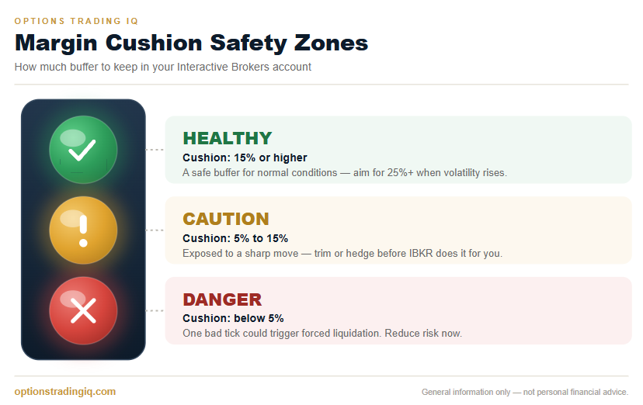
- Maintain a margin cushion of at least 10-15% to handle normal fluctuations.
- During volatile markets, such as earnings season or geopolitical uncertainty, increase that buffer to 25% or more.
If your margin cushion drops below 5%, you’re skating on thin ice, and one bad tick could trigger liquidation.
How To Avoid Forced Liquidation
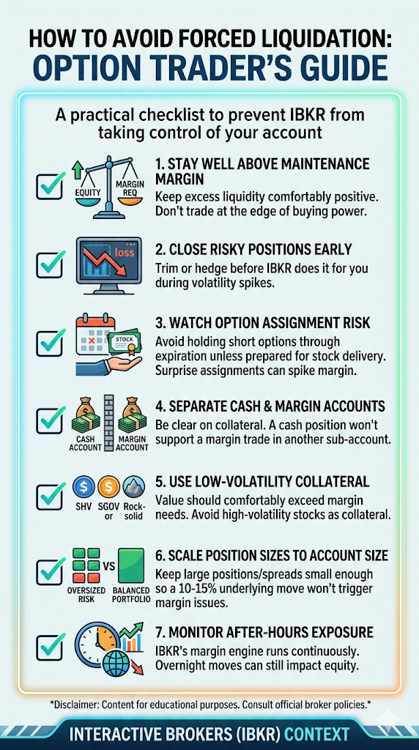
Here’s a practical checklist to prevent IBKR from taking control of your account:
1. Stay well above maintenance margin. Keep excess liquidity comfortably positive. Don’t trade at the edge of your buying power, and give yourself room for price swings.
2. Close risky positions early. If volatility spikes or a position moves against you, trim or hedge before IBKR does it for you.
3. Watch the option assignment risk. Avoid holding short options through expiration unless you’re prepared for possible stock delivery. A surprise assignment can double or triple your margin requirement overnight.
4. Avoid mixing cash and margin trades carelessly. If you run both types of accounts, be clear on which one holds your collateral. A position in a cash account won’t support a margin trade in another sub-account.
5. Use low-volatility collateral. If you’re using ETFs like SHV or SGOV as collateral, make sure their value comfortably exceeds margin needs. Avoid high-volatility stocks as collateral.
6. Scale position sizes to account size. Keep large positions or spreads small enough that a 10-15% move in the underlying won’t trigger margin issues.
7. Monitor after-hours exposure. IBKR’s margin engine runs continuously, even after market hours. Overnight futures or extended-hours stock moves can still impact your equity and trigger forced sales.
If you look closely, almost every forced liquidation traces back to the same root cause: position sizing and trade structure that left no room for error.
Learning to build income trades with defined risk from the very start is the single biggest protection you have.
If you’re new to selling options and want a step-by-step way to learn how to size and structure conservative income trades, Options Income Mastery walks through exactly that.
Example: A Short Put Gone Wrong
Suppose you sell 5 naked puts on AAPL at the 240 strike price for $3 each.
That’s $1,500 in premium received, but roughly $120,000 in margin exposure.
If AAPL drops from 250 to 230 overnight, your puts go deep in the money.
Your unrealised loss spikes, and IBKR increases your margin requirement.
If your equity falls below maintenance levels, IBKR will begin liquidating positions automatically, without any regard for which stocks you would like to sell first.
All of this can happen before you even wake up.
What Happens During Forced Liquidation
If IBKR begins forced liquidation, here’s what typically happens:
- The system identifies the positions causing the margin shortfall.
- It automatically starts selling or buying back positions to reduce exposure.
- Orders are executed at market prices, not limit prices.
- Liquidation continues until your account is above the maintenance margin.
There’s no manual override or appeal.
Once liquidation starts, you’re out of control.
And since market orders are used, execution can be poor, sometimes locking in losses that could have been avoided with proactive management.
Recovering After A Liquidation
If your account has been liquidated:
– Review the daily statement to understand what was closed.
– Check your margin requirements and current equity.
– Rebuild positions slowly, don’t immediately re-enter trades.
– Learn from what caused the issue. Was it leverage, assignment, or collateral loss?
Forced liquidation is painful, but it’s also a valuable risk management lesson.
Pro Tips To Stay Safe At IBKR
– Keep 20-30% of buying power unused at all times.
– Avoid maxing out leverage, especially on short options.
– Use defined-risk spreads instead of naked options.
– Close in-the-money short options before expiration.
– Track daily P/L impact on margin using Risk Navigator.
– Stay calm during volatility spikes. Don’t overreact by adding risk.
These simple habits will keep your account stable even when markets go wild.
Frequently Asked Questions
Does Interactive Brokers Warn You Before a Forced Liquidation?
Not in the traditional sense.
IBKR does not issue old-style margin calls that give you days to add funds.
The platform shows real-time margin metrics and can send alerts that you configure yourself.
Still, once your account breaches maintenance margin, the risk engine can begin liquidating immediately, with no phone call and no grace period.
Can I Stop a Forced Liquidation Once It Has Started?
Generally no.
The process is fully automated and runs until your account is back above maintenance margin.
You cannot appeal it or place a manual override mid-liquidation.
The only real control you have is acting beforehand, by reducing risk while your margin cushion is still healthy.
How Much Margin Cushion Should I Keep?
A common rule of thumb is to maintain a cushion of 10-15% under normal conditions and 25% or more during volatile periods such as earnings season or major macro events.
Below 5%, a single sharp move can be enough to trigger liquidation.
Does Forced Liquidation Happen in Cash Accounts?
Forced liquidation is a margin-account event.
A pure cash account with fully funded positions does not carry the same maintenance-margin risk.
The danger arises when leverage is involved, and it is easy to take on leverage unintentionally by mixing cash and margin trades or carelessly using sub-accounts.
Australian SMSF traders using Interactive Brokers Australia should note that most SMSF trust deeds prohibit the use of margin entirely, meaning positions must be fully funded and forced liquidation risk is significantly reduced.
See our guide on trading options in an SMSF for the specifics.
Will IBKR Liquidate My Safest Positions First?
Not necessarily.
The risk engine is built to reduce IBKR’s exposure quickly, so it often closes whatever is most liquid, which can mean selling stable, low-volatility holdings like Treasury ETFs or index funds rather than the risky position that caused the problem in the first place.
Can Forced Liquidation Happen Overnight or Outside Market Hours?
Yes.
IBKR’s margin engine runs continuously.
Overnight gaps, extended-hours moves, and futures activity can all push your equity below maintenance margin, and liquidation can begin at the next opportunity, sometimes before you are even awake.
What Is the Difference Between a Margin Call and Forced Liquidation?
A traditional margin call is a request to add funds within a set time.
Forced liquidation skips that step entirely: the broker closes positions for you to restore compliance.
IBKR’s model leans heavily on the second approach, which is why proactive monitoring matters so much.
How Do I Check My Current Margin Cushion?
Open the Account Window in Trader Workstation or the Client Portal and look at Excess Liquidity and Margin Cushion (%).
If either figure is trending toward zero, treat it as an early warning and reduce risk before the platform does it for you.
Final Thoughts
Interactive Brokers is one of the most sophisticated platforms in the world, but with that power comes strict margin enforcement.
Forced liquidation isn’t personal.
It’s an automated safeguard designed to protect both you and the broker from catastrophic losses.
The key is to stay well ahead of the margin curve: monitor your metrics daily, build a safety buffer, and size trades conservatively.
In options trading, capital preservation always comes before capital growth.
And keeping IBKR’s liquidation engine out of your account is the first step toward staying in control.
If you want to go further, Options Income Mastery is the best starting point for learning to build conservative, defined-risk income trades, while The Accelerator Program goes deeper into portfolio-level risk and margin management for more experienced traders.
We hope you enjoyed this article on avoiding forced liquidation at Interactive Brokers.
If you have any questions, please send an email or leave a comment below.
Trade safe!
Disclaimer: The information above is for educational purposes only and should not be treated as investment advice. The strategy presented would not be suitable for investors who are not familiar with exchange traded options. Any readers interested in this strategy should do their own research and seek advice from a licensed financial adviser.