





A trader can use a conditional order to enter a vertical spread only when the underlying reaches a predetermined price level.
This can be particularly useful when a trader has identified a potential trade setup but wants to wait for confirmation before entering the position.
Instead of continuously watching the market and manually placing an options order when the desired price is reached, the trader can establish the conditions in advance.
When the underlying satisfies the condition, the trading platform automatically submits the vertical spread order.
We will use Salesforce (CRM) as an example.
Suppose CRM is in an upward trend but is currently pulling back.
Rather than immediately entering a bull put credit spread, the trader wants to wait for CRM to demonstrate renewed strength by moving above a specified price.
Contents
Example: Bull Put Credit Spread On Salesforce
For example, Salesforce (CRM) has pulled back from its recent high and is currently trading $247.72 as shown.
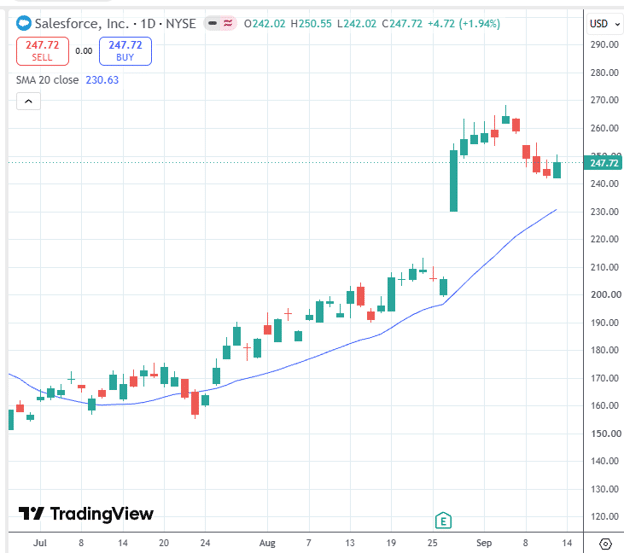
Source: tradingview
Rather than immediately entering a bull put credit spread, the trader wants to wait for CRM to demonstrate renewed strength by moving above a specified price of $250.
When that condition is met, the trader wants to initiate a bullish put credit spread:
Sell one contract Oct 30th CRM $225 put
Buy one contract Oct 30th CRM $220 put
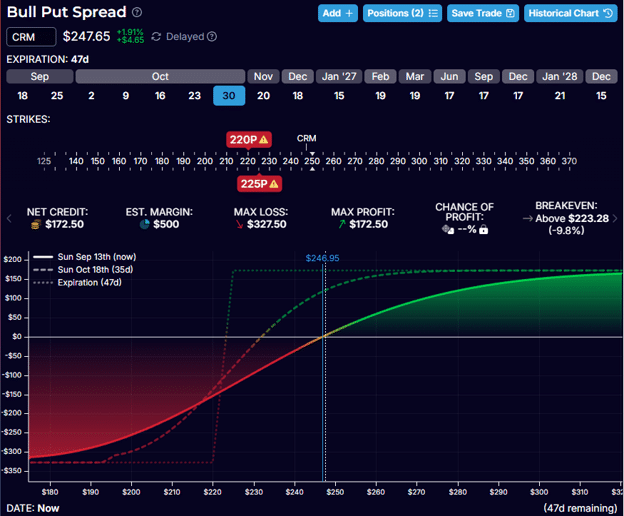
Source: OptionStrat
Based on the model, the credit spread should receive around a credit of $172 with a max loss of $327.
However, we will not know the exact price at the time the order triggers.
We will demonstrate our conditional order using ThinkOrSwim.
(Only certain trading platforms have the capability to enter such orders.)
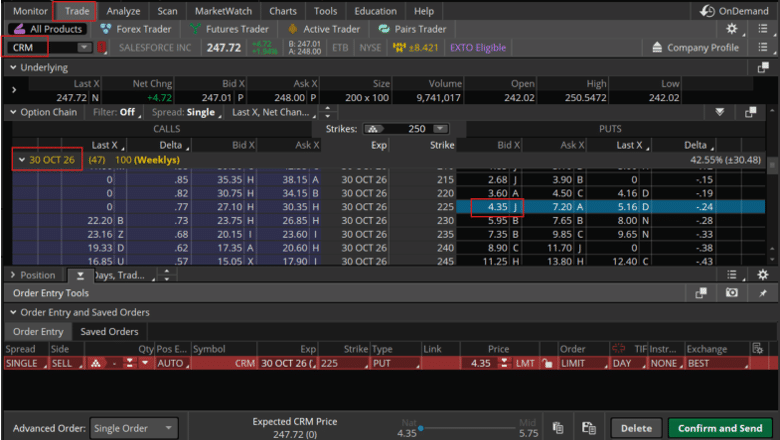
We are in the Trade tab with ticker CRM on the Oct 30 expiration…
Source: ThinkOrSwim
We click on the cell in the Bid column to sell the $225 put option such that we see that leg of the order in the Order Entry tab.
To add the second leg to the order, we hold the Control key and click on the cell in the Ask column to buy the $220 put option.
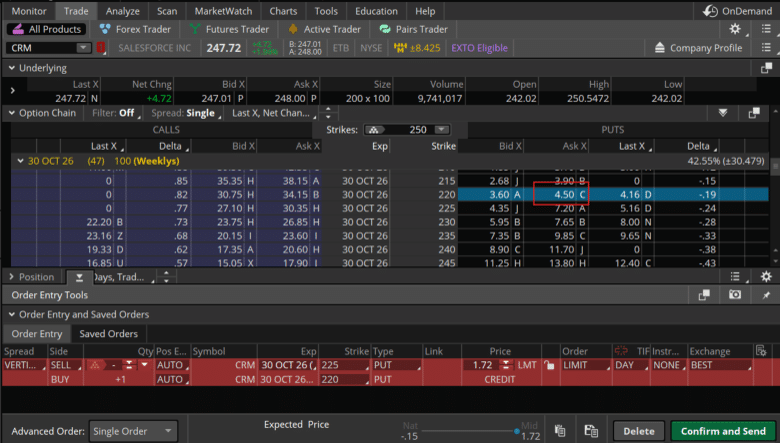
Now we see both legs in the Order Entry as one single order.
The mid-price for this order is $1.72 credit on a per share basis.
As the underlying price of CRM moves around and its volatility changes, this credit amount will vary.
In fact, as CRM moves up (which would be what we want to happen upon entry), the spread will be further away from the money and hence would fetch lower credit.
We give some leeway by saying that we are willing to enter the trade as long as we get at least a credit of $1.50 or higher.
We alter the limit order to be $1.50 and set time in force to be GTC (good till cancel).

Next, click on the settings icon on the right or the order entry block (shown above).
You won’t see it until you hover over it.
This brings up the Order Rules dialog where we configure the conditions as shown…
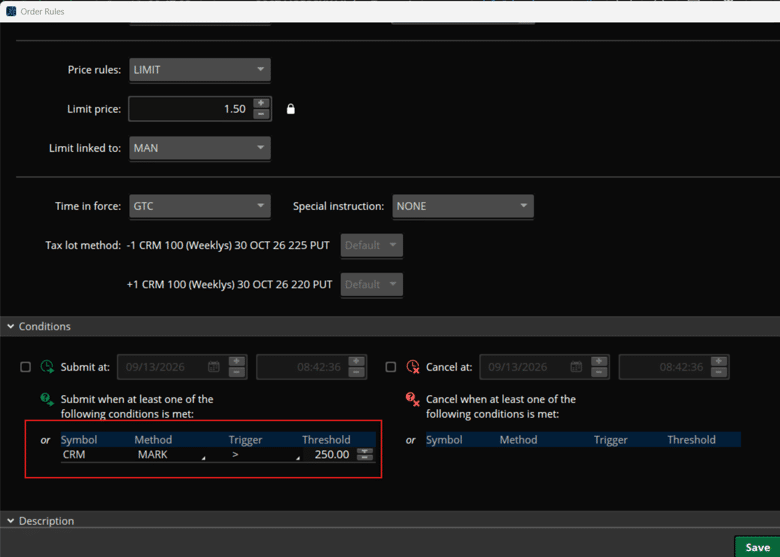
The MARK method means Thinkorswim is monitoring CRM’s mark price for the condition.
The order will trigger if the CRM price exceeds $250.00.
Further above in the dialog, we have…
Price rules: LIMIT
Limit price: 1.50
Limit linked to: MAN
MAN means “manual.”
This is to specify that $1.50 is the minimum credit we want to receive.
Click Save to the Order Rules and then Confirm and Send in the Order Entry.
Double check the entry in the Order Confirmation dialog…
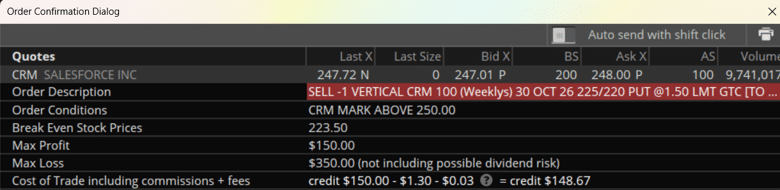
And hit Send.
Now in the Monitor tab, you see the Working Order with Status of waiting condition…

We can click on the settings icon to review your conditions.
Triggering of the conditional order does not guarantee that the vertical spread will fill.
The underlying price condition merely causes the spread order to be submitted.
The option market must still be able to execute the spread at the specified limit price to get at least a credit of $1.50.
In general, it is best to use limit order for all options trades.
But since we are not at the computer to negotiate the best fills, set the limit with some leeway to increase the probability of it filling.
FAQ
What Is A Conditional Order In Options Trading?
A conditional order is an order that is only submitted to the market when a specified condition is met, typically a price condition on the underlying stock or index.
Unlike a standard limit order which sits in the market immediately, a conditional order waits until the trigger is satisfied before the order even appears on the exchange.
This allows traders to plan entries in advance without needing to monitor the market continuously.
Does Every Broker Support Conditional Options Orders?
No.
Conditional options orders are available on some platforms but not all.
ThinkorSwim (now part of Charles Schwab) supports them through the Order Rules feature demonstrated in this article.
Interactive Brokers also supports conditional orders through TWS.
Most basic retail platforms (Robinhood, Webull, basic mobile apps) do not support this feature.
Check your broker’s platform documentation before planning a strategy that relies on conditional orders.
Why Might A Conditional Order Trigger But Not Fill?
Because the trigger condition only causes the order to be submitted, it doesn’t guarantee execution.
Once CRM crosses $250 and the bull put credit spread order is submitted, the market must still be able to fill the spread at your specified limit price.
If the spread is moving quickly or liquidity is thin, the market may move past your $1.50 limit before the order can fill.
This is why setting the limit with some leeway (rather than at the exact current mid-price) improves the probability of getting a fill.
What Is The “MAN” Setting In ThinkorSwim’s Order Rules?
MAN stands for “manual”.
It tells ThinkorSwim that the limit price you’ve entered ($1.50 in this example) is a fixed, manually set price that should not be linked to or automatically adjusted based on the spread’s current market price.
This ensures that when the condition triggers, the order goes in at exactly your specified $1.50 minimum credit, not at whatever the current mid-price happens to be at that moment.
Can I Use Conditional Orders For Strategies Other Than Bull Put Spreads?
Yes.
Conditional orders can be applied to any multi-leg options strategy your platform supports as a single order.
Bear call spreads, iron condors, and even calendar spreads can all be set up as conditional orders in ThinkorSwim.
The same principles apply: set the trigger condition on the underlying, set a limit price with appropriate leeway, and use GTC so the order remains active beyond the current session.
Conclusion
A conditional vertical spread order is a powerful tool for traders who want to wait for price confirmation before entering a position — without sitting at the computer waiting for the trigger manually.
The key points to remember from this walkthrough:
The condition (CRM > $250) triggers the order submission but doesn’t guarantee a fill — the spread still needs to fill at or above your limit price
Give yourself some leeway on the limit credit ($1.50 vs the current $1.72 mid) to account for the fact that as CRM moves higher, the spread moves further OTM and will fetch less premium
Always use GTC so the order remains active if the trigger doesn’t fire on the same day
Review the working order in the Monitor tab to confirm the condition was saved correctly before walking away
In Part 2, we’ll look at the other side of this technique: using a conditional vertical spread as a reactive hedge for an existing options position.
Want to Learn More Advanced Options Entry Techniques?
Conditional orders are one of many tools that systematic options income traders use to execute strategies efficiently without constant market monitoring.
Options Income Mastery covers the full framework — from strategy selection and strike placement to order execution and trade management — so every decision follows a repeatable process.
Learn more about Options Income Mastery →
We hope you enjoyed this article on triggering a conditional vertical spread.
If you have any questions, please send an email or leave a comment below.
Trade safe!
Disclaimer: The information above is for educational purposes only and should not be treated as investment advice. The strategy presented would not be suitable for investors who are not familiar with exchange traded options. Any readers interested in this strategy should do their own research and seek advice from a licensed financial adviser.